Getting started with cURL🔗
Overview🔗
This article introduces REST API testing using cURL, with examples of different HTTP operations against the Matillion ETL API. cURL is a command line tool for transferring data to and from a URL (the name stands for "Client URL").
For REST APIs, you can use Postman as a GUI (graphical user interface) or cURL as a CLI (command line interface) to perform the same tasks.
This article uses cURL to demonstrate GET, POST, and DELETE request calls against a Matillion REST API.
Note
- To experiment with the Matillion ETL API, you need permission to access the Matillion ETL instance.
- To check whether cURL is installed, run
curl --versionfrom the command line (also called the Terminal). If it isn't installed, download and install it. - For more information, see Matillion ETL API - v1.
- For more information on making REST API requests using the GUI client Postman, see Getting Started with Postman.
cURL CLI arguments🔗
Below are a few cURL arguments used in the requests in this article. All requests are simply curl followed by the argument and data to supply.
| cURL command | Description | Example |
|---|---|---|
-H or --header |
Submits the request header to the resource. Headers are common with REST API requests because the authorization is usually included in the header. | curl -H "Content-Type: application/json" "http://www.example.com"curl -H "Accept: application/json" "http://www.example.com" |
-i or --include |
Includes the response headers in the server's response to an API call. | curl -i "http://www.example.com" |
-X or --request |
This specifies the HTTP method to use with the request. If you use -d in the request, curl automatically specifies a POST method. With GET requests, including the HTTP method is optional, because GET is the default method. |
curl -X POST -d "resource-to-update" "https://www.example.com"curl -X GET "https://www.example.com" |
-d or --data |
Includes data to post to the URL, especially used in the POST requests. The data needs to be URL encoded. Data can also be passed in the request body. |
curl -X POST -d "data-to-post" "https://www.example.com" |
@filename |
Loads content from a file. | curl -X POST -d @filename.json "https://www.example.com" |
-u or --user <user:password> |
Specifies the user name and password to use for server authentication. | curl -u "user:password" "https://www.example.com" |
-k or --insecure |
This allows curl to process the request even when the server connection would otherwise be considered insecure. | curl -k "http://www.example.com" |
-o or --output <file> |
This allows curl to save the response to a file. | curl -o filename.json "http://www.example.com" |
See the curl documentation for a comprehensive list of curl commands you can use.
Authentication🔗
Matillion ETL API requires authentication to make any REST API call. The Matillion ETL API uses HTTP Basic Authentication. The details of HTTP Basic Authentication are beyond the scope of this document, but it essentially requires a username and password, which the Matillion ETL instance hashes.
In the cURL request, add -u "user:password" before the URL. For example:
curl -u "<user>:<password>" http(s)://<InstanceAddress>/rest/v1
Working with cURL GET request🔗
Summary🔗
This is the default method for making HTTP calls with curl. GET requests retrieve information from the URL without making changes to the endpoint. In the example, you retrieve resource information by performing a GET request against a named resource endpoint.
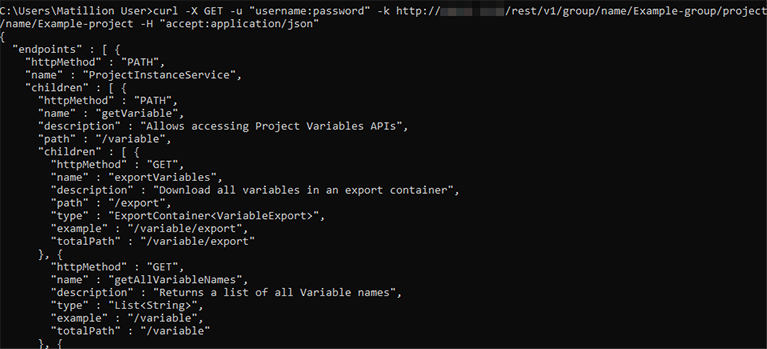
Whenever you reach a named resource endpoint, the API exposes metadata for that resource, including the available PATH, GET, POST, and DELETE method options. In the example below, the metadata shows the PATH options for Example-project.
Base URL🔗
curl -X GET -u "<user>:<password>" -k "http://<InstanceAddress>/rest/v1/group/name/<groupName>/project/name/<projectName>" -H "accept: application/json"
Server response🔗
{
  "endpoints" : [ {
    "httpMethod" : "PATH",
    "name" : "ProjectInstanceService",
    "children" : [ {
      "httpMethod" : "PATH",
      "name" : "getVariable",
      "description" : "Allows accessing Project Variables APIs",
      "path" : "/variable",
      "children" : [ {
        "httpMethod" : "GET",
        "name" : "exportVariables",
        "description" : "Download all variables in an export container",
        "path" : "/export",
        "type" : "ExportContainer<VariableExport>",
        "example" : "/variable/export",
        "totalPath" : "/variable/export"
      }, {
        "httpMethod" : "POST",
        "name" : "importVariableExport",
        "description" : "Import a new Variable",
        "path" : "/import",
        "arguments" : [ {
          "style" : "QUERY",
          "name" : "ignoreMissingEnvironments",
          "type" : "boolean",
          "defaultValue" : "true"
        },
        ......
Note
Resource names are case-sensitive and must be URL encoded where appropriate (for example, when the resource name contains a space).
Working with cURL GET/export request🔗
Summary🔗
In this example, you export a job named "Example-Job" within a project in the group resource of a Matillion ETL instance. This is a GET API call that exports the resource's detail.
Note
Jobs imported/exported through the API are incompatible with the in-client import/export feature. If a job is exported through the API, it must be imported through the API and vice-versa.
Base URL🔗
curl -X GET -u "<user>:<password>" -k "http://<InstanceAddress>/rest/v1/group/name/<groupName>/project/name/<projectName>/version/name/<versionName>/job/name/<jobName>/export"
Server response🔗
{
    "objects": [
        {
            "jobObject": {
                "JobType": ".OrchestrationJob",
                "id": 2126346,
                "revision": 3,
                "created": 1591688363574,
                "timestamp": 1591688363574,
                "components": {
                    "2126347": {
                        ......
            },
            "info": {
                "id": 2126346,
                "name": "Example-Job",
                "type": "ORCHESTRATION",
                "tag": "123564748-6997-428a-b988-2eb532fd7d78"
            },
            "path": []
        }
    ],
    "version": "1.44.11",
    "environment": "redshift"
}
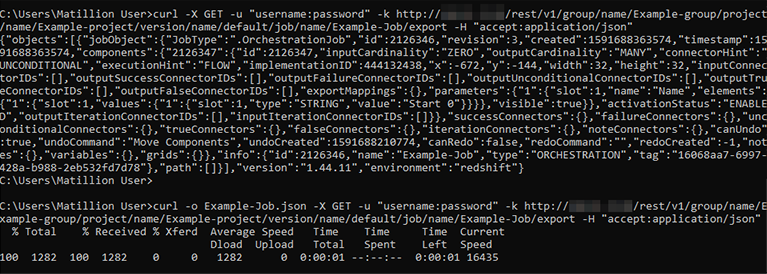
To export the job, you need to download the file in JSON format. To do this, add -o Filename.json before the cURL URL. After adding the argument, the command looks like this:
curl -o Example-Job_New.json -X GET -u "<user>:<password>" -k "http://<InstanceAddress>/rest/v1/group/name/<groupName>/project/name/<projectName>/version/name/<versionName>/job/name/<jobName>/export"
Note
The job file name is edited and renamed to Example-Job_new.json (so as to avoid a name conflict with the existing job) before being imported back into Matillion ETL.
Working with cURL POST/import request🔗
Summary🔗
Now that you have exported a job (see the previous example), you can use the API to import that job into a Matillion ETL instance. Note that there is no "merge" option when importing. If a resource of the same name already exists, you must delete the existing resource before importing the new one. This is a POST method API call, and you attach the exported project as a JSON file in the body to import it into the Matillion ETL instance.
In the previous example, the JSON file (Example-Job_new) has already been exported and renamed to avoid a conflict. This example uses the same JSON file to import into the instance.
Base URL🔗
curl -X POST -u "<user>:<password>" -k "http://<InstanceAddress>/rest/v1/group/name/<groupName>/project/name/<projectName>/version/name/<versionName>/job/import" -H "Content-Type: application/json" --data @Example-Job_new.json
Server response🔗
{
  "name" : "Jobs",
  "statusList" : [ {
    "success" : true,
    "name" : "Example-Job_new"
  } ],
  "success" : true
}
The API call creates this job (Example-Job_new) in the Matillion ETL instance. Note that the job name was changed to "Example-Job_new" in the JSON; otherwise, you would get an error for importing a job whose name already exists (Example-Job). You can now switch to this project in the Matillion ETL instance.

API import conflicts—explanation🔗
There is an optional parameter for API import: onConflict, which determines what should happen if an import clashes with something that already exists, e.g. a project with a given name. The options are ERROR, SKIP, and OVERWRITE.
This can happen when you try to import: project groups, projects, versions, jobs, passwords, schedules, and environments. Each outcome is as follows:
- ERROR: Sends an error back.
- SKIP: Skips importing any clashes, preserving the existing object.
- OVERWRITE: Removes the existing object and replaces it with what has been imported.
The following examples use cURL:
curl -X POST -u api-user:api-user "https://<InstanceAddress>/rest/v1/group/import" -H "Content-Type: application/json" --data @mtln_project_grp.json
This would become:
curl -X POST -u api-user:api-user "https://<InstanceAddress>/rest/v1/group/import?onConflict=ERROR" -H "Content-Type: application/json" --data @mtln_project_grp.json
Or:
curl -X POST -u api-user:api-user "https://<InstanceAddress>/rest/v1/group/import?onConflict=SKIP" -H "Content-Type: application/json" --data @mtln_project_grp.json
Or:
curl -X POST -u api-user:api-user "https://<InstanceAddress>/rest/v1/group/import?onConflict=OVERWRITE" -H "Content-Type: application/json" --data @mtln_project_grp.json
This depends on what you want to happen when you try to import something that already exists. The default is ERROR.
Working with cURL DELETE request🔗
Summary🔗
In this example, you delete an existing job named Example-Job from within the project of the Matillion ETL instance. This is an HTTP DELETE API call to remove a resource from within the group of resources.
Base URL🔗
curl -X DELETE -u "<user>:<password>" -k "http://<InstanceAddress>/rest/v1/group/name/<groupName>/project/name/<projectName>/version/name/<versionName>/job/name/Example-Job"
Server response🔗
{
  "success" : true,
  "msg" : "Successfully deleted Job: Example-Job_new",
  "id" : 2126481
}

URL parameters and description🔗
Below is the list of endpoint parameters (used in the guide) and their brief description:
| Parameter name | Description |
|---|---|
<InstanceAddress> |
This is the server IP address or domain name. |
<version> |
This is the API version (not versions created in the tool). |
<endpoint> |
This is the part of the API used to make an API call. |
<groupName> |
The name of the group created in the Matillion ETL instance. |
<projectName> |
The name of the project created in the group. |
<scheduleName> |
The name of the schedule. |
<versionName> |
The name of the version. |
<jobName> |
The name of the job within the project. |
<delete> |
Deletes the specified resource. |
Conclusion🔗
This article covered the basics of using cURL to test Matillion API REST services. cURL can do much more than what's covered here, but this should be enough for most purposes. Type curl -h on the command line to see all the available options. For details on the REST API used in the examples, see API v1 Maps in our support documentation.