Amazon EKS deployment guide for Maia Foundation runners🔗
This document helps you understand AWS-specific architecture decisions, deployment considerations, and readiness requirements for running Maia Foundation runners on Amazon Elastic Kubernetes Service (EKS). EKS provides a managed Kubernetes control plane for running Maia Foundation runners in your AWS infrastructure. This deployment model combines AWS-native security features (IAM Roles for Service Accounts) with Kubernetes operational flexibility.
For complete Terraform modules, Helm charts, and step-by-step implementation instructions, see the AWS agent directory in the Matillion deployment library on GitHub.
You should read the general Kubernetes deployment guide before reading this document.
What you get with EKS deployment🔗
- Managed Kubernetes control plane. AWS handles the Kubernetes API server, etcd, and control plane upgrades.
- IAM Roles for Service Accounts (IRSA). Credential-free authentication to AWS services.
- Flexible worker nodes. EC2 instances, Fargate, or hybrid deployments.
- AWS Integration. Native support for CloudWatch, VPC networking, and AWS Load Balancers.
- Horizontal Pod Autoscaler. Scale Maia Foundation runner pods based on metrics.
- Cluster Autoscaler. Automatically adjust EC2 worker node capacity.
When to choose EKS🔗
Choose EKS for Maia Foundation runner deployment when:
- You have existing AWS infrastructure and expertise.
- You need IRSA for secure, credential-free access to AWS services (S3, Secrets Manager).
- You require integration with AWS monitoring and security tools (CloudWatch, GuardDuty).
- You want Kubernetes operational flexibility with AWS managed services.
- You plan to deploy Maia Foundation runners across multiple availability zones for high availability.
Prerequisites and readiness🔗
AWS account requirements🔗
Required AWS services:
- Amazon EKS enabled in your target region.
- Sufficient EC2 service quotas for worker nodes.
- VPC with public and/or private subnet configuration.
Your AWS identity (user or role) needs permissions to:
- Create and manage EKS clusters and node groups.
- Create and manage EC2 instances, Auto Scaling groups, and Launch Templates.
- Create IAM roles, policies, and IRSA configurations.
- Manage VPC resources (subnets, route tables, security groups, NAT gateways).
- Access AWS Secrets Manager (for storing OAuth credentials).
- Create S3 buckets (for Maia Foundation runner staging data).
- Configure CloudWatch Logs and metrics
We recommend you use an administrative role for initial deployment, then scope down to least-privilege for ongoing operations.
Matillion account setup🔗
Before deploying infrastructure, create a Maia Foundation runner in the Matillion Maia console.
You need to obtain the following information about the Maia Foundation runner you created:
- Account ID: Your Matillion organization identifier.
- Runner ID: Unique identifier for this runner (auto-generated).
- OAuth Client ID and Secret: Maia Foundation runner authentication credentials.
- Region:
us1(United States) oreu1(Europe).
These credentials are required for the Helm deployment in Phase 4. Store them securely.
For details, read create a Maia Foundation runner.
Required tools🔗
Ensure these tools are installed and configured on your deployment workstation:
- Terraform 1.0+ for infrastructure provisioning.
- AWS CLI - Configured with credentials (
aws configureor environment variables). - kubectl for Kubernetes cluster management.
- Helm 3.x for application deployment.
Verify prerequisites:
# Verify AWS CLI authentication
aws sts get-caller-identity

# Verify tool versions
terraform --version
kubectl version --client
helm version
Architecture decision points🔗
Before deploying, make these key architectural decisions.
1. VPC strategy🔗
| Option | When to use | What gets created |
|---|---|---|
| Create New VPC | Isolated Maia Foundation runner deployment, no existing VPC. | New VPC with public and private subnets across 3 AZs, NAT gateways, route tables. |
| Use Existing VPC | Integrate with existing AWS infrastructure. | EKS cluster in existing VPC, may create new subnets if needed. |
Set use_existing_vpc = true/false in Terraform variables.
2. Subnet strategy🔗
If using existing VPC, decide whether to use existing subnets or create new.
| Option | Requirements | Considerations |
|---|---|---|
| Existing Subnets | Private subnets with NAT gateway or NAT instance for outbound internet. | Must have available IP addresses for EKS nodes and pods. |
| Create New Subnets | Room in existing VPC CIDR for new subnet ranges. | Terraform creates new subnets within existing VPC. |
Note
If using EKS Fargate, you must provide private subnets with NAT gateway access. Fargate requires private subnets and will fail with public subnets.
3. Public vs private cluster🔗
| Setting | API server access | Use case |
|---|---|---|
| Public Cluster | API server publicly accessible from authorized IP ranges. | Development, testing, faster initial setup. |
| Private Cluster | API server accessible only from within VPC. | Production, enhanced security, requires bastion host or VPN. |
Set is_private_cluster = true/false in Terraform variables.
For private clusters, ensure:
- Deployment workstation has VPN or bastion access to VPC.
- CI/CD runners can access cluster API server.
- Authorized IP ranges include your access points.
4. Authentication strategy🔗
IAM Roles for Service Accounts (IRSA) - Recommended:
- Maia Foundation runner pods assume IAM role without storing credentials.
- Automatic credential rotation by AWS STS.
- Least-privilege access to AWS services (S3, Secrets Manager).
- Terraform module configures IRSA automatically.
Static OAuth credentials:
- OAuth credentials stored in Kubernetes Secrets.
- Use only if IRSA cannot be implemented (not recommended for EKS).
Recommendation: Always use IRSA for EKS deployments. The deployment library Terraform module creates the required IAM roles and policies automatically.
5. Worker node strategy🔗
Node Instance Sizing:
| Instance type | vCPU | Memory | Use case |
|---|---|---|---|
t3.medium |
2 | 4 GB | Development, testing, low workload |
t3.large |
2 | 8 GB | Small production workloads. |
m5.large |
2 | 8 GB | Baseline production. |
m5.xlarge |
4 | 16 GB | Medium production workloads. |
m5.2xlarge |
8 | 32 GB | High-throughput production workloads. |
Considerations:
- Transformation-heavy workloads: SQL generation tasks, low Maia Foundation runner CPU usage → Smaller instances sufficient.
- Data ingestion/scripting workloads: High data transfer, processing on Maia Foundation runner → Larger instances needed.
- Pod density: Larger instances allow more Maia Foundation runner pods per node, reducing operational overhead.
Configure instance type in Terraform node group settings.
6. Scaling strategy🔗
Static Replica Count:
- Fixed number of Maia Foundation runner pods (e.g., 2, 5, 10).
- Predictable capacity and costs.
- Suitable for steady-state workloads.
Horizontal Pod Autoscaler (HPA):
- Automatically scales Maia Foundation runner pods based on CPU, memory, or custom metrics.
- Configure min/max replicas (e.g., min: 2, max: 10).
- Responds to workload spikes dynamically.
Cluster Autoscaler:
- Automatically adds/removes EC2 worker nodes based on pod scheduling needs.
- Works in tandem with HPA.
- Optimizes infrastructure costs.
Recommendation: start with static replicas, add HPA as you understand workload patterns.
Container Images🔗
Maia Foundation runner images are available in AWS ECR Public Registry:
Image Repository: public.ecr.aws/matillion/etl-agent.
Available Tags:
:stable- Slower release cycle, maximum stability, recommended for production.:current- Faster release cycle, earlier access to new features.
Both tags are production-ready. Choose :stable for stability-first deployments, or :current for early access to features.
No authentication is required. ECR Public images can be pulled without AWS credentials.
Deployment journey🔗
Expected timeline🔗
- Phase 1 - Maia Foundation runner registration: 10 minutes (Matillion console).
- Phase 2 - Infrastructure provisioning: 15-20 minutes (Terraform: VPC, EKS cluster, IRSA).
- Phase 3 - Configure kubectl access: 2 minutes (AWS CLI + kubectl).
- Phase 4 - Maia Foundation runner deployment: 5-10 minutes (Helm chart).
- Phase 5 - Validation: 15-30 minutes (Pre-deployment checks + testing).
Total: 50-75 minutes for first-time deployment.
Phase 1: Maia Foundation runner registration (Matillion console)🔗
Refer to Prerequisites, above, for details of Maia Foundation runner creation.
What you'll have at the end:
- Account ID
- Agent ID
- OAuth Client ID and Secret
- Region (us1 or eu1)
Store these securely. You'll need them for Helm deployment in Phase 4.
Phase 2: Infrastructure provisioning (Terraform)🔗
The Terraform module creates:
-
Amazon EKS Cluster:
- Managed Kubernetes control plane (API server, etcd, controller manager).
- EKS-managed upgrades and patching.
- CloudWatch logging for control plane components.
-
Worker Node Groups:
- EC2 Auto Scaling group with configurable instance types.
- Launch template with Amazon EKS-optimized AMI.
- Kubernetes node labels and taints (if configured).
-
IAM Roles and IRSA:
- EKS cluster IAM role (for cluster operations).
- Node group IAM role (for EC2 instances).
- IRSA-enabled service account role for Maia Foundation runner pods.
- IAM policies for S3, Secrets Manager, CloudWatch.
-
VPC and Networking (if creating new):
- VPC with public and private subnets across 3 availability zones.
- NAT gateways for outbound internet from private subnets.
- Route tables and internet gateway.
- Security groups for control plane and node group communication.
-
Security Groups:
- Control plane security group (API server access).
- Node security group (inter-node and pod communication).
- Rules for HTTPS outbound to Matillion control plane.
In terraform.tfvars you will need to make these configuration changes:
- region: Your AWS region (e.g.,
us-east-1,us-west-2). - name: Cluster name prefix (e.g.,
matillion-agent). - use_existing_vpc:
trueorfalse. - cidr_block: VPC CIDR if creating new (e.g.,
172.5.0.0/16). - is_private_cluster:
trueorfalse. - authorized_ip_ranges: List of CIDRs allowed to access API server.
- tags: Resource tags for cost allocation and organization.
After terraform apply completes, retrieve the Terraform outputs using:
terraform output cluster_name
terraform output service_account_role_arn
The service_account_role_arn is required for Helm deployment in Phase 4.
Where to implement: EKS Terraform Module.
Phase 3: Configure kubectl access🔗
You must configure kubectl to authenticate to your EKS cluster using the AWS CLI.
The aws eks update-kubeconfig command retrieves cluster endpoint and certificate authority data, then configures your local kubeconfig file with AWS IAM authentication.
The command is:
aws eks update-kubeconfig --region <region> --name <cluster-name>
Use the <region> and <cluster-name> from your Terraform variables.
Verification:
kubectl get nodes
kubectl get namespaces
You should see EKS worker nodes and default Kubernetes namespaces.
Phase 4: Maia Foundation runner deployment (Helm)🔗
The Helm chart deploys:
-
Maia Foundation runner Pods:
- Deployment with configurable replica count (default: 2).
- Each pod runs the Maia Foundation runner binary.
- Resource requests and limits for CPU and memory.
-
ServiceAccount:
- Kubernetes ServiceAccount annotated with IAM role ARN (from Phase 2).
- Enables IRSA for credential-free AWS access
-
ConfigMaps:
- Maia Foundation runner configuration (account ID, Maia Foundation runner ID, region).
- Environment-specific settings.
-
Secrets:
- OAuth Client ID and Secret for Matillion control plane authentication.
-
Service:
- Kubernetes Service exposing Prometheus metrics endpoint (port 8080).
- Annotated for Prometheus service discovery.
You will provide the following configuration values:
| Value | Source | Example |
|---|---|---|
cloudProvider |
Static | "aws" |
config.oauthClientId |
Phase 1 (Matillion console) | "abc123..." |
config.oauthClientSecret |
Phase 1 (Matillion console) | "secret456..." |
serviceAccount.roleArn |
Phase 2 (terraform output) |
"arn:aws:iam::123456789:role/..." |
dpcAgent.dpcAgent.env.accountId |
Phase 1 (Matillion console) | "12345" |
dpcAgent.dpcAgent.env.agentId |
Phase 1 (Matillion console) | "agent-prod-01" |
dpcAgent.dpcAgent.env.matillionRegion |
Phase 1 (Matillion console) | "us1" or "eu1" |
dpcAgent.replicas |
Your decision | 2 (baseline) to 10+ (high throughput) |
dpcAgent.dpcAgent.image.repository |
Static | "public.ecr.aws/matillion/etl-agent" |
dpcAgent.dpcAgent.image.tag |
Your decision | "stable" or "current" |
Where to implement:
Phase 5: Validation and testing🔗
Run automated pre-deployment validation scripts to verify Maia Foundation runner pod environment:
# From deployment library root
./agent/helm/checks/run-check.sh --namespace matillion --release matillion-agent
What gets checked:
- ✅ Python 3 and Java runtime available.
- ✅ Filesystem permissions correct.
- ✅ Environment variables set (ACCOUNT_ID, AGENT_ID, etc.)
- ✅ cgroup CPU and memory limits applied.
- ✅ Network connectivity to Matillion control plane.
- ⚠️ Security agents that might interfere (Crowdstrike, Prisma Cloud).
Manual verification:
- Matillion Console: Navigate to Manage runners. Verify Maia Foundation runner status shows "Connected".
- Test Pipeline: Create a simple pipeline (e.g. "Hello World" transformation) and execute.
- Prometheus Metrics: Verify metrics available at
http://<pod-ip>:8080/actuator/prometheus.
Maia Foundation runner application logs are available in CloudWatch Logs (if Container Insights enabled):
- Log group:
/aws/eks/<cluster-name>/cluster. - Pod logs: Filterable by pod name.
Maia Foundation runner architecture on EKS🔗
How data flows🔗
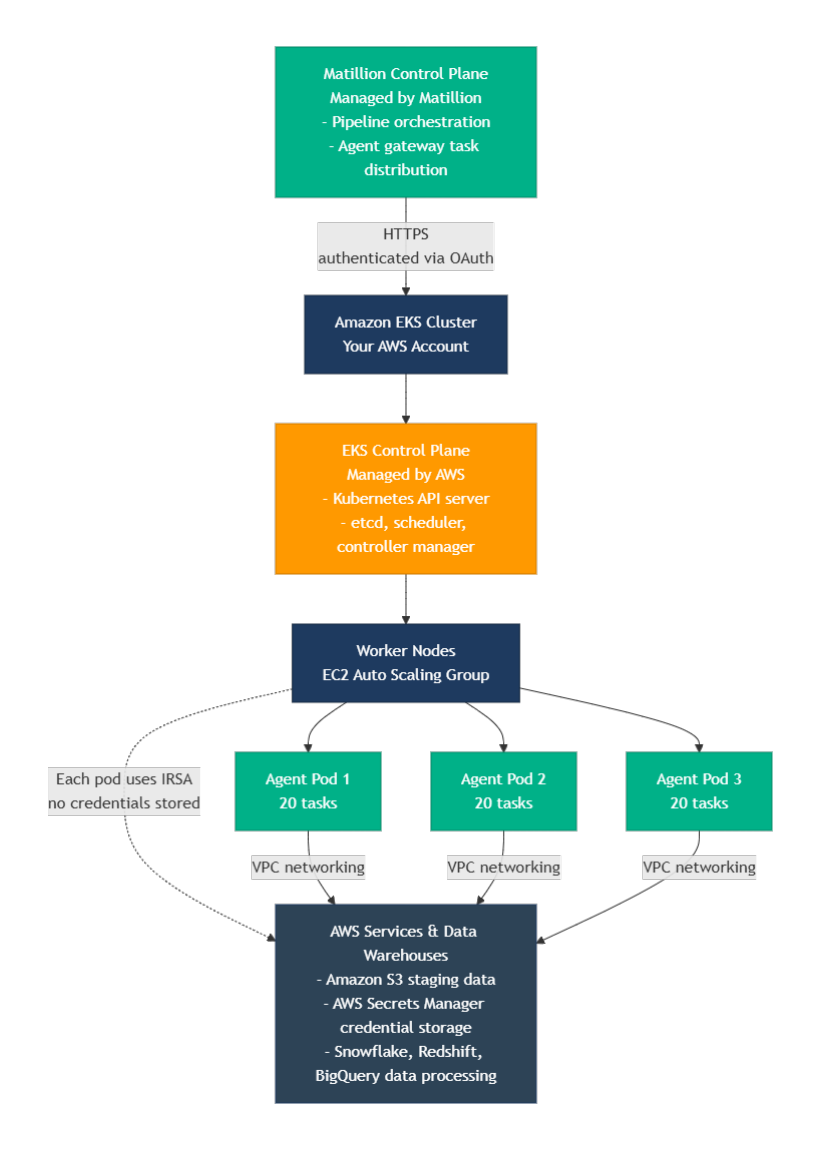
This shows the architecture flow from the Matillion Control Plane through the Amazon EKS cluster down to the Maia Foundation runner pods connecting to your data services.
IAM Roles for Service Accounts (IRSA)🔗
How IRSA works:
- Kubernetes ServiceAccount is annotated with IAM role ARN.
- EKS OIDC Provider allows Kubernetes to issue tokens trusted by AWS IAM.
- Maia Foundation runner pod assumes IAM role using projected service account token.
- AWS STS exchanges token for temporary AWS credentials (valid 1 hour, auto-refreshed).
- Maia Foundation runner accesses AWS services (S3, Secrets Manager) without storing credentials.
Security benefits:
- No long-lived AWS credentials in cluster.
- Automatic credential rotation (every hour).
- Least-privilege access (IAM role scoped to specific S3 buckets, secrets).
- Pod-level isolation (each pod has its own token).
What the Terraform module creates for IRSA:
- IAM OIDC provider for EKS cluster.
- IAM role for Maia Foundation runner service account.
- IAM policy allowing access to S3, Secrets Manager, CloudWatch.
- Trust relationship allowing Kubernetes service account to assume role.
Task capacity and throughput🔗
Per-Pod Capacity: Each Maia Foundation runner pod can execute up to 20 concurrent tasks.
Throughput calculation: Maximum concurrent tasks = (Number of Maia Foundation runner pods) × 20.
Examples:
- 2 pods (default) = 40 concurrent tasks.
- 5 pods = 100 concurrent tasks.
- 10 pods = 200 concurrent tasks.
Scaling guidance:
- For transformation workloads: Tasks generate SQL executed by data warehouse. Maia Foundation runner CPU/memory usage is low. Fewer pods needed.
- For data ingestion workloads: Tasks transfer and process data on Maia Foundation runner. Maia Foundation runner CPU/memory usage is high. More pods needed.
Queuing behavior: When all pods are at capacity (20 tasks each), new tasks queue in Matillion's agent gateway until capacity becomes available.
Monitoring and observability🔗
Native Prometheus metrics🔗
Maia Foundation runner pods expose Prometheus-compatible metrics at:
- Endpoint:
http://<pod-ip>:8080/actuator/prometheus. - Service: Automatically created by Helm chart with Prometheus annotations.
Key metrics:
app_version_info: Maia Foundation runner version and build metadata.app_agent_status: Maia Foundation runner status (1 = running, 0 = stopped).app_active_task_count: Current number of executing tasks.app_active_request_count: Active HTTP requests to Maia Foundation runner.app_open_sessions_count: Open connections to data warehouses.
The Helm chart includes annotations for automatic Prometheus service discovery:
prometheus.io/scrape: "true"
prometheus.io/port: "8080"
prometheus.io/path: "/actuator/prometheus"
If Prometheus is deployed in your cluster, it will automatically discover and scrape these metrics.
AWS CloudWatch integration🔗
Enable CloudWatch Container Insights for comprehensive EKS monitoring:
- Cluster-level metrics (CPU, memory, network).
- Pod-level metrics (resource usage per Maia Foundation runner pod).
- Node-level metrics (EC2 worker node health).
Maia Foundation runner application logs are streamed to CloudWatch Logs:
- Centralized log aggregation.
- Query with CloudWatch Logs Insights.
- Set up alarms on error patterns.
Recommended CloudWatch Alarms:
- Maia Foundation runner pod restarts > threshold.
- Maia Foundation runner pods in CrashLoopBackOff state.
- Task execution failures (requires custom metric from Maia Foundation runner logs).
- Worker node CPU/memory > 80%.
Recommended monitoring setup🔗
- Use Prometheus for Maia Foundation runner-specific metrics (task count, session count, Maia Foundation runner status).
- Use CloudWatch for infrastructure metrics (cluster health, node capacity, pod restarts).
- Set up Grafana dashboards combining Prometheus and CloudWatch metrics.
-
Configure alerts:
- Maia Foundation runner connectivity to Matillion control plane lost.
- Task queue depth increasing (capacity insufficient).
- Maia Foundation runner pod memory usage approaching limits.
Security best practices🔗
Network security🔗
VPC Configuration:
- Deploy Maia Foundation runner pods in private subnets for enhanced security.
- Use NAT Gateway for outbound internet access (required for Matillion control plane).
- Restrict network security groups to minimum required ingress/egress.
Outbound connectivity requirements:
- HTTPS (443) to Matillion control plane (region-specific endpoints).
- HTTPS/JDBC to data warehouse endpoints (Snowflake, Redshift, BigQuery).
- HTTPS (443) to AWS APIs (S3, Secrets Manager, STS for IRSA).
Security group recommendations:
- Egress: Allow HTTPS (443) to specific endpoints only (avoid 0.0.0.0/0 if possible).
- Ingress: No inbound traffic required (Maia Foundation runner initiates all connections).
Private cluster considerations:
- API server accessible only from VPC (or authorized VPN/bastion).
- Requires VPN or AWS Systems Manager Session Manager for kubectl access.
- CI/CD pipelines need VPC connectivity or VPN access.
Pod security standards🔗
The Helm chart implements Kubernetes pod security standards.
Security context configuration:
- Run as non-root user (UID 65534).
- Read-only root filesystem.
- No privilege escalation.
- Drop all Linux capabilities.
- Seccomp profile: RuntimeDefault.
Example from Helm chart:
securityContext:
  runAsNonRoot: true
  runAsUser: 65534
  fsGroup: 65534
  seccompProfile:
    type: RuntimeDefault

containers:
  - securityContext:
      allowPrivilegeEscalation: false
      capabilities:
        drop: ["ALL"]
Secrets management🔗
OAuth Credentials Storage Options:
- AWS Secrets Manager (Recommended):
- Store OAuth credentials in AWS Secrets Manager
- Use External Secrets Operator to sync to Kubernetes Secrets
- Automatic rotation support
- Centralized secret management across environments
- Kubernetes Secrets (Default):
- Credentials provided via Helm values.
- Stored as base64-encoded Kubernetes Secret.
- Not encrypted at rest by default (enable EKS envelope encryption)
Recommendation: For production, use AWS Secrets Manager with External Secrets Operator for centralized, auditable secret management.
EKS envelope encryption🔗
Enable envelope encryption for Kubernetes Secrets at rest:
- EKS integrates with AWS KMS.
- Secrets encrypted with customer-managed KMS key.
- Decryption on-demand when pods access secrets.
Configure in Terraform EKS module settings.
Scaling considerations🔗
When to scale🔗
Indicators to add more Maia Foundation runner pods:
- Task queue depth consistently > 0 (check Matillion console or metrics).
- Pipeline execution time increases due to task queuing.
- More concurrent pipelines being executed.
- Workload characteristics change (more data ingestion vs transformation).
Indicators to keep current capacity:
- Task queue depth consistently = 0.
- Maia Foundation runner pod CPU < 60%, memory < 70%.
- Pipeline execution times stable.
- Workload primarily transformation (SQL generation).
Horizontal Pod Autoscaler (HPA)🔗
How it works:
- Kubernetes HPA monitors pod metrics (CPU, memory, or custom metrics).
- Automatically scales Deployment replicas within configured min/max range.
- Evaluates every 15 seconds (default), scales up/down based on thresholds.
Example HPA configuration:
- Min replicas: 2 (baseline availability).
- Max replicas: 10 (cost control).
- Target CPU: 70% (scale up when average CPU > 70%).
Configure via Helm values or separate HPA manifest.
Read the HPA documentation for details.
Cluster autoscaler🔗
How it works:
- Monitors pods in Pending state (unable to schedule due to insufficient node capacity).
- Automatically adds EC2 worker nodes to Auto Scaling group.
- Removes underutilized nodes after 10 minutes of low usage.
Works with HPA:
- HPA scales Maia Foundation runner pods based on metrics.
- If pods can't schedule (no node capacity), cluster autoscaler adds nodes.
- Maia Foundation runner pods schedule on new nodes.
- When load decreases, HPA scales down pods, cluster autoscaler removes empty nodes.
Read the cluster autoscaler setup documentation for more details.
Vertical scaling🔗
Adjust CPU and memory limits per pod via Helm values:
- Useful when individual tasks require more resources than current pod limits.
- Requires pod restart to apply new resource limits.
- Consider workload characteristics (transformation vs ingestion).
Cost optimization🔗
EKS pricing components🔗
EKS Cluster: $0.10 per hour per cluster (~$73/month)
-
EC2 Worker Nodes: Pay for EC2 instances (varies by instance type and region).
t3.medium: ~$30/month (2 vCPU, 4GB RAM).m5.large: ~$70/month (2 vCPU, 8GB RAM).m5.xlarge: ~$140/month (4 vCPU, 16GB RAM).
-
Data Transfer: Outbound data transfer charges (data warehouse connections, Matillion control plane).
- NAT Gateway: ~$32/month per AZ + data processing charges.
Cost optimization strategies🔗
- Right-size worker nodes: Match instance type to workload (transformation-heavy = smaller, ingestion-heavy = larger).
- Use Cluster Autoscaler: Automatically remove unused nodes during low-usage periods.
- Consider Savings Plans or Reserved Instances: For predictable baseline capacity.
- Monitor data transfer: Ensure data warehouses in same region to avoid cross-region charges.
- Evaluate Fargate: For variable workloads, Fargate pricing may be more cost-effective (pay per pod vs per EC2 instance).
Additional resources🔗
Implementation and deployment🔗
For complete Terraform modules, Helm charts, and step-by-step implementation, see the following in the Matillion Deployment Library on GitHub:
You can find the Matillion Deployment Library at github.com/matillion-public/deployment-library.
General Kubernetes guide🔗
You should read the general Kubernetes deployment guide for platform-agnostic concepts and architecture.
Matillion documentation🔗
- For deployment models, read Maia Foundation runner overview.
- For Maia Foundation runner registration, read Create a Maia Foundation runner.
- For capacity planning, read Scaling best practices.
AWS documentation🔗
- For EKS concepts and operations, read Amazon EKS user guide.
- For IRSA set up, read IAM Roles for Service Accounts.
- For automatic node scaling, read Cluster Autoscaler.